1. Software Information
- File Name: `Win11ToggleShowMoreOptions_2026_08_08_13_22_41.exe`
- Version: v1.0.0
- Supported Operating System: Windows 11
- License: Freeware
- Distribution: Portable — no installation required. Simply download and run the executable. The program does not install any additional components on your system.
- No Ads, Plugins, or Third-Party Bundles: The software contains only the files required for its intended functionality. It does not include advertisements, promotional software, plugins, or any other third-party bundled programs.
- Privacy-Friendly: The software does not collect personal information or upload data unrelated to its intended functionality.
- Lightweight and Fast: Designed to solve practical Windows usage problems with minimal resource usage and a simple, straightforward interface. No complicated configuration is required.
- Security Note: This software is independently developed and maintained by this website. Basic security checks are performed before each release to help minimize potential security risks. Because software from independent developers typically has a relatively small installation and usage base, Windows SmartScreen may display a security warning when you run the program for the first time. This is a normal security measure used by Windows for applications from unknown or less-established sources and does not necessarily indicate that the program is unsafe. If you would like to perform an additional security check, you can scan the file using third-party security services such as VirusTotal.
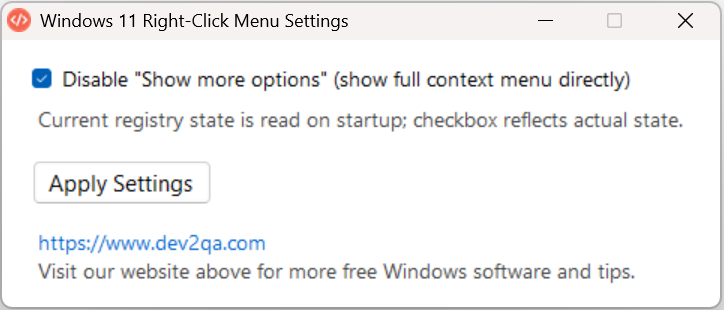
- Screenshot:
2. SHA-256 File Verification
- SHA-256:
9217a79376d61e92e28193dfc5fd50a3ebf2afbdbda076b1b3ee66f1e08a2e28. - After downloading and extracting the software, open a Command Prompt (CMD) window and navigate to the directory containing the program file. Run the following command to calculate the file's SHA-256 hash:
certutil -hashfile Win11ToggleShowMoreOptions_2026_08_08_13_22_41.exe SHA256 - Compare the resulting hash with the SHA-256 value shown above. If the two values match exactly, you can verify that the downloaded file has not been modified or corrupted since it was published.
>certutil -hashfile Win11ToggleShowMoreOptions_2026_08_08_13_22_41.exe SHA256
SHA256's  Win11ToggleShowMoreOptions_2026_08_08_13_22_41.exe hash:
9217a79376d61e92e28193dfc5fd50a3ebf2afbdbda076b1b3ee66f1e08a2e28
CertUtil: -hashfile Command completed successfully。
3. Changelog
3.1 2026-08-08
- Fixed the bug where language switching via command line failed to work.
3.2 2026-07-20
- Rewrote the utility in C#.
- Further reduced package size to only 755 KB.
3.3 2026-07-18
- Added Traditional Chinese support.
- CMD command-line arguments for temporary language switching: `--lang zh` / `--lang zh_TW` / `--lang en`.
- Increased font size.
- Moved website link above the descriptive text.
3.4 2026-07-13
- One-click toggle to disable or restore the Windows 11 right-click "Show more options" menu.
- Automatically read current registry status on launch; checkbox state syncs with system configuration.
- Support for Simplified Chinese and English (automatically matches system regional settings).
- CMD command-line arguments for temporary language switching: `--lang zh` / `--lang en`.
- Changed text color to dark gray for better readability.
4. Usage Instructions
- Guide for this custom utility: Windows 11 Right-Click Menu 'Show More Options' Optimizer | Lightweight Utility
5. Download Link
Download
or download free
[free_download_btn]
Categories & Tags
Similar Downloads
No related download found!
